

Baseus VD1 Pro Solar Dash Cam Front and Rear, 4K+1080P Dash Camera for Cars, Battery Powered Parking Mode, Starvis Night Vision, 32 GB Card Included, 5GHz WiFi, GPS, Wide Angle,Voice Control
Black
£138.74
Sale price
£138.74
Regular price
£126.13
Skip to product information


Baseus VD1 Pro Solar Dash Cam Front and Rear, 4K+1080P Dash Camera for Cars, Battery Powered Parking Mode, Starvis Night Vision, 32 GB Card Included, 5GHz WiFi, GPS, Wide Angle,Voice Control
£138.74
Sale price
£138.74
Regular price
£126.13


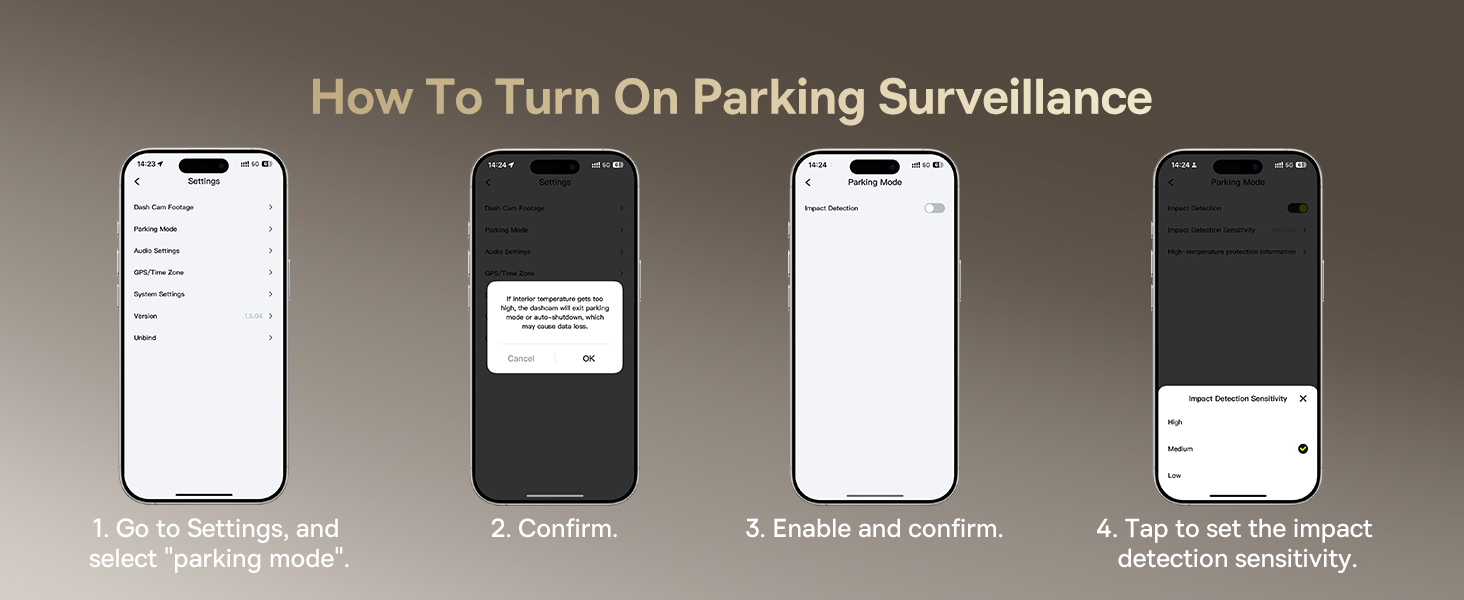


- Solar & Battery Parking Protection: Powered by Baseus Solar Sync System and a built-in lithium battery, this dash cam provides up to 14 days of parking mode protection without a hardwire kit. When the car is turned off, it enters low-power standby and records a 30-second clip only when a collision is detected. Designed for parking event recording, not continuous recording.
- Important Power Note — How Recording Works: Solar and battery power support parking protection and event-triggered recording only. Continuous recording while driving requires connection to the car’s power supply using the included cable (no hardwire kit needed).The rear camera also requires a wired connection.
- 4K Front + 1080P Rear Dual Recording: Record stunning 4K UHD HDR front and 1080P rear footage with clear license plates and road signs day or night. The 140° front and 120° rear wide-angle lenses provide reliable front-to-rear vehicle coverage. Front and rear cameras record simultaneously once connected.
- Enhanced STARVIS Night Vision for Low-Light Driving: Featuring an IMX335 STARVIS sensor, 6-layer glass lens, and f/1.6 aperture, this dash cam reduces noise and captures critical details even in near-total darkness—ideal for night driving and parking incidents.
- 5GHz WiFi 6, App Control: Built-in 5GHz WiFi 6 enables video downloads up to 3× faster. Use the free Baseus App to preview and save footage, view GPS data, and receive OTA updates.English voice control allows hands-free operation. 𝐀𝐩𝐩 𝐯𝐢𝐞𝐰𝐢𝐧𝐠 𝐰𝐨𝐫𝐤𝐬 𝐨𝐧𝐥𝐲 𝐰𝐡𝐞𝐧 𝐲𝐨𝐮𝐫 𝐩𝐡𝐨𝐧𝐞 𝐢𝐬 𝐜𝐥𝐨𝐬𝐞 𝐭𝐨 𝐭𝐡𝐞 𝐜𝐚𝐫 𝐚𝐧𝐝 𝐜𝐨𝐧𝐧𝐞𝐜𝐭𝐞𝐝 𝐭𝐨 𝐭𝐡𝐞 𝐝𝐚𝐬𝐡 𝐜𝐚𝐦’𝐬 𝐖𝐢-𝐅𝐢. For best performance, format the microSD card directly in the dash cam before first use.
- Note: The dash cam records front and rear footage at the same time, but displays one camera view at a time—press the button to switch to the rear camera view. All videos can be reviewed in the file folder via the app.
| Brand | Baseus |
| Model Name | VD1 Pro |
| Vehicle Service Type | ATV, Bus, Car, Minivan, RV, SUV, Tractor, Truck |
| Connectivity Technology | Wi-Fi |
| Special Feature | Compact Design, [5GHz Wi-Fi 6 + Smart Baseus App Control + OTA Firmware Update], [Enhanced Night Vision with HDR + True 4K Front + 1080P Rear Recording], [GPS + Voice Control + Solar panel + Built-In Battery + G-sensor], [Hardwire-Free Parking Mode + G-Sensor Protection + Loop Recording] See more |
| Video Capture Resolution | 2160p |
| Included Components | Car charger with usb c cable × 1, Dash Cam 4K × 1, Rear Camera (AHD transmission, 6m, black) × 1, Trim Tool x 1; 3M Adhesive Pad x1; Static Cling Film x1, microSD Card × 1 See more |
| Mounting Type | Dashboard Mount |
| Color | Black |
| Field Of View | 170 degrees |